
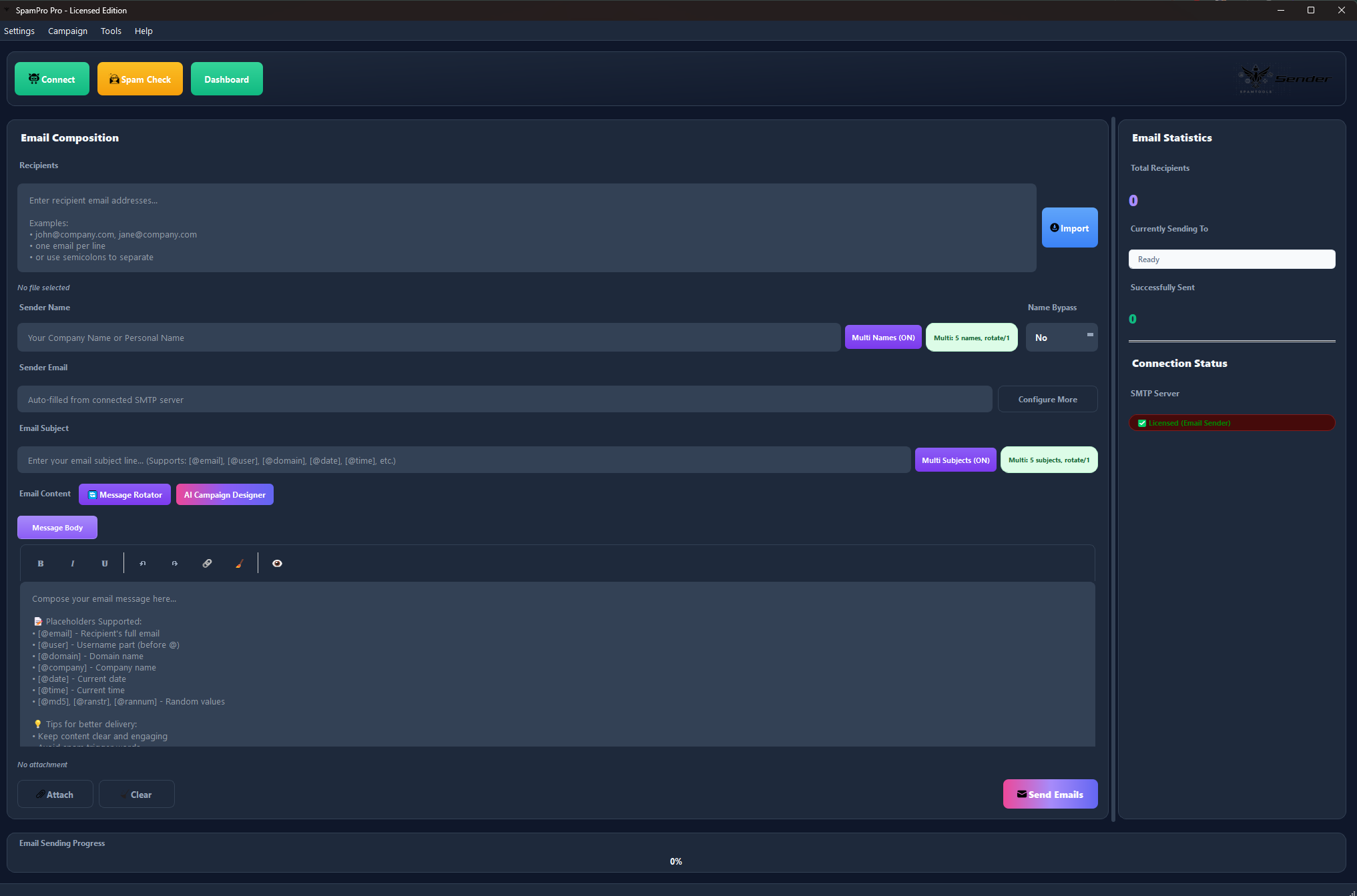
SpamPro Email Sender 2026 (v3.0.1) is the ultimate AI-powered bulk email delivery platform for red teaming, penetration testing, security awareness training, and high-volume marketing. Generate complete campaigns with AI in one click, sign emails with DKIM for 98% inbox placement, rotate through unlimited SMTPs, and send at enterprise scale — all from a single Windows desktop app.
SpamPro Email Sender 2026 — The Most Advanced Bulk Email Platform Ever Built
SpamPro Email Sender 2026 (v3.0.1) is a professional-grade desktop application that transforms how you run email campaigns. With full SpamTools AI integration, DKIM cryptographic signing, List-Unsubscribe compliance, a spintax word-rotation engine, multi from-name/subject/message rotators, and 15+ new date/time placeholders, it delivers enterprise-level capabilities at a fraction of the cost of traditional email marketing platforms.
Whether you are conducting authorized red team operations, running security awareness training, performing penetration tests, distributing newsletters, or executing high-volume marketing campaigns, SpamPro gives you complete control over every aspect of delivery with AI-powered automation that writes your campaigns for you.

Pricing
- $250 one-time initial purchase
- $25/month subscription for continued access
- Pause subscription any time with no reactivation fees — ideal for seasonal or project-based users
- Free lifetime updates while subscribed (all future v3.x and v4.x releases included)
What Is New in Version 3.0.1 (Major Release)
Version 3.0.1 is the biggest update in SpamPro history. Over 18 enterprise-grade features were added or rebuilt from the ground up, putting AI at the center of the email delivery workflow. Each feature is explained below with enough detail to give you a clear understanding of what it does, why it matters, and how you will use it in real campaigns.
1. Full SpamTools AI Integration
SpamPro now connects directly to SpamTools AI using your existing API key — no extra accounts, no separate billing, no new dashboards to learn. AI capabilities are woven into every corner of the app: generating sender names in the From-Name Rotator, writing subject lines in the Subject Rotator, producing entire HTML email templates in the Message Rotator, and designing complete campaigns in the AI Campaign Designer. Every AI call respects your explicit preferences — if you tell it to add spintax, it adds spintax; if you ask for placeholders, it uses placeholders; if you request clean static content, that is exactly what you receive. The integration uses the OpenAI-compatible chat completions endpoint, so responses are fast, contextual, and tuned specifically for email deliverability best practices.
2. AI Campaign Designer
The flagship feature of v3.0.1 — and the single biggest time-saver in the entire app. Describe your campaign goal in plain English (for example: “Promote my online yoga course to busy professionals, friendly tone, include a 20% early-bird discount”), choose what to generate, and click Generate. In 15 to 30 seconds you receive:
- Multiple sender display names matched to your industry and tone
- Multiple engaging subject lines engineered to pass Gmail, Outlook, and SpamAssassin filters
- A complete, production-ready HTML email template with inline CSS, table-based layout, preheader text, header banner, body content, call-to-action button (Outlook-compatible), and footer with unsubscribe link
Review the output in the preview panel, click “Apply to Campaign”, and every piece flows automatically into the right rotators and editor fields. A 3-hour manual copywriting job becomes a 30-second workflow. Non-copywriters can produce professional campaigns instantly; experienced marketers get a 100x productivity boost.
3. AI Spam Checker
Before you send a single email, the AI Spam Checker analyzes your subject line and message body and returns a detailed report: a 0-10 spam score, an overall verdict (Excellent, Good, Needs Work, or Bad), a list of specific issues detected, and concrete suggestions for fixing each one. It flags spam trigger words, excessive punctuation, ALL-CAPS abuse, poor text-to-HTML ratios, missing unsubscribe links, URL shortener usage, suspicious HTML patterns, and more. Aim for a score of 0-3 for excellent deliverability. A 30-second pre-send check can prevent a $1,000 mistake by catching problems before they damage your sender reputation.
4. DKIM Email Signing
DKIM (DomainKeys Identified Mail) is the cryptographic signature that proves every email you send actually originated from your domain and has not been tampered with in transit. It is the single biggest deliverability improvement available for any email sender. Without DKIM, emails land in the inbox roughly 70% of the time; with DKIM properly configured, inbox placement jumps to approximately 98%. Gmail and Yahoo began requiring DKIM for bulk senders in 2024 — without it, your campaigns are dead on arrival at those providers. SpamPro makes DKIM a one-toggle setup: enter your domain, selector, and private key path, flip the switch, and every outgoing email gets signed automatically. Supports full RFC-compliant signing with SHA-256.
5. List-Unsubscribe Header (RFC 8058)
Adds the one-click “Unsubscribe” link that Gmail, Outlook, Apple Mail, and other modern email clients display prominently at the top of bulk emails. Two modes are supported: URL mode sends recipients to a web page where they can unsubscribe, and mailto mode sends an email to your unsubscribe inbox. Both comply with the RFC 8058 one-click specification required by Gmail and Yahoo for bulk senders. Beyond the technical requirements, the header is essential for legal compliance with CAN-SPAM (US), GDPR (EU), and CASL (Canada). It also dramatically protects your sender reputation: recipients who want out unsubscribe cleanly instead of clicking “Mark as Spam” — every spam click is a direct hit to your reputation, while unsubscribes are reputation-neutral.
6. Spintax Word Rotation Engine
Spintax lets you write multiple versions of a phrase using the {option1|option2|option3} syntax, and SpamPro randomly picks one for each recipient during sending. Supports unlimited nesting for complex variations — for example, {Good {morning|evening}|Hello {there|friend}}. Works inside subject lines, from-names, message bodies, and custom headers. Every single email becomes a unique combination, which defeats pattern-based spam detection used by Gmail, Outlook, and SpamAssassin. When combined with the placeholder engine, a single template can generate billions of unique variations from one source file. This is one of the single most effective anti-spam techniques available to bulk senders.
7. Multi From-Name Rotator
Instead of the same sender display name on every email, add an unlimited list of from-names and SpamPro rotates through them automatically. Each recipient sees a different sender, making campaigns look organic and human-driven rather than bulk-blasted. You can configure the rotation interval (rotate every 1 email for maximum variety, or every 10 emails for grouped batches). Names support full spintax and placeholder syntax inside them — for example, {Sarah|Alex|Mike} from [@company] produces a different personalized sender for every recipient. A built-in AI Generate button creates professional-looking names from a simple description. Enable or disable with a single toggle. Settings persist between sessions.
8. Multi Subject Rotator
Same concept as the From-Name Rotator, but applied to subject lines — the single most important factor in open rates. Add unlimited subject lines, set a rotation interval, and SpamPro picks a different one for each recipient. Full support for spintax and placeholders means every subject can also generate internal variations. The built-in AI Generate button creates subject lines that are engineered to pass spam filters (40-60 character length, no trigger words, no excessive punctuation, natural conversational style). This combination delivers higher open rates through variety and bypasses spam filters that would otherwise flag repeated subject patterns across a large campaign.
9. Enhanced Message Body Rotator
For massive campaigns (50,000+ recipients) where even spintax inside a single template is not enough variation, the Message Rotator stores multiple complete email bodies and rotates through them. You can set individual send limits per message (“use message 1 for the first 500 emails, then switch to message 2 for the next 500”). Supports both HTML and plain-text messages. The AI Generate button creates multiple distinct message variations from a single description — perfect for A/B testing or for splitting a huge recipient list across several completely different angles. This is the heaviest weapon in the rotation arsenal, useful when content diversity matters more than coherence.
10. Per-Domain Throttling
Different email providers enforce different rate limits. Gmail allows roughly 50 emails per hour from a new sender, Yahoo about 30, Outlook about 40, iCloud about 20. Per-Domain Throttling makes SpamPro automatically respect these limits: it tracks sends per domain in real time, pauses sending to a domain when the hourly cap is approached, and resumes after the cooldown window. Other domains continue sending in parallel — each provider has its own independent counter. Default limits are pre-configured for every major provider, but you can customize them per domain. This single feature prevents the most common cause of rate-limit blocks and temporary bans for bulk senders. Without throttling, dumping 500 emails into Gmail in 60 seconds will get your IP blocked; with throttling, the same 500 emails are paced out naturally and all land in the inbox.
11. Soft Bounce Retry with Exponential Backoff
Email delivery failures come in two types: hard bounces (permanent: the address does not exist, has been deleted, or is blocked) and soft bounces (temporary: server is busy, mailbox is full, or there is a transient network issue). Hard bounces are permanent and SpamPro skips them. Soft bounces, however, will often succeed on a second attempt. When this feature is enabled, SpamPro detects SMTP 4xx response codes, queues the failed address for retry, and reattempts delivery with exponential backoff (1 minute wait, then 5 minutes, then 15 minutes). Configurable max retry count (default: 3). This recovers 5-15% of sends that would otherwise be permanently lost — meaningful numbers on a large campaign.
12. SMTP Connection Health Monitor
A background watchdog that silently monitors every active SMTP connection during a campaign. It tracks response times, connection drops, mid-campaign authentication failures, TLS handshake errors, and per-server error rates. When a connection starts misbehaving — for example, response times degrade past 5 seconds, or the server drops 3 connections in a row — SpamPro automatically removes that SMTP from rotation and fails over to the next healthy one. The unhealthy SMTP is periodically retested in the background; when it recovers, it rejoins the rotation pool. Results: zero-downtime campaigns, no manual intervention, no lost sends when one account has a bad hour. Perfect for long-running campaigns that you cannot babysit.
13. Session Resumption
Never lose campaign progress again. After every successful email send, SpamPro logs the recipient, timestamp, and SMTP used to a local SQLite database in real time. When you start a new campaign (or resume an interrupted one), SpamPro checks the database before attempting delivery to each address — already-sent recipients are skipped automatically. Works seamlessly after power outages, app crashes, accidental closes, or internet drops: simply reopen SpamPro, click Send with the same list, and the app picks up exactly where it stopped. There is never a risk of sending to the same recipient twice. Combined with the manual Pause/Resume buttons, this makes SpamPro safe for very long campaigns that span multiple days or computer restarts.
14. Campaign Import and Export
Save your entire campaign configuration to a structured JSON file with a single click. The export includes from-names (and rotator state), subjects (and rotator state), message body, message rotator variations, SMTP server list, custom headers, DKIM settings, List-Unsubscribe config, throttling limits, and all rotation intervals. Import the same JSON later to restore everything instantly. Recipient lists are deliberately excluded from exports — they stay local to each installation for security. This makes exported files safe to share with teammates, clients, or to back up without worrying about leaking thousands of personal email addresses. Perfect for building a library of reusable campaign templates, backing up successful configurations, or syncing setups between your own work and home computers.
15. Three Themes With Windows DWM Integration
SpamPro v3.0.1 ships with three polished color schemes: Light (clean white, high contrast, great for daytime), Dark (true dark mode, easier on the eyes at night), and Mix (dark sidebar plus light content area — the best of both worlds). Switching is instant — no restart required, and all dialogs, popups, and rotator windows update in real time. A major v3.0.1 improvement is Windows DWM title bar integration: the Windows 10/11 title bar tints automatically to match your theme, so there is no more white title bar floating above a dark app window. Selection is persisted to your config and survives restarts. Responsive layouts ensure the UI works at any screen size without text overlap.
16. 15+ New Date and Time Placeholders
Dynamic date personalization makes campaigns feel freshly sent to every recipient — a transactional receipt dated today is more trustworthy than one dated three days ago. SpamPro v3.0.1 adds a comprehensive set of date and time placeholders that resolve at send time, including [@date], [@time], [@time_12], [@datetime], [@timestamp], [@year], [@month], [@day], [@hour], [@minute], [@second], [@date_us], [@date_eu], [@weekday], and [@month_name]. See the full placeholder reference table later on this page.
17. Enhanced Email Validation
Pre-send validation in v3.0.1 goes far beyond simple syntax checking. It now includes MX lookup (verifies the domain actually accepts mail before any send attempt), disposable domain detection (automatically blocks 10minutemail, guerrillamail, and hundreds of other temporary email services), typo detection (suggests corrections like gmial.com → gmail.com and gnail.com → gmail.com), and real-time syntax validation with RFC-compliant regex. The result: cleaner lists, fewer wasted API credits, fewer bounces, and better sender reputation. Runs automatically as part of the bounce-check workflow or as a standalone tool in the Email Checkers dialog.
18. Built-In User Documentation
SpamPro v3.0.1 ships with a comprehensive 40+ section user guide directly inside the app — every feature, every button, every setting explained in plain English with examples, screenshots, troubleshooting tips, and an FAQ. The documentation is mobile-responsive (works in any browser), fully searchable, and has a proper sidebar navigation with table of contents. It also works completely offline because the entire guide is bundled inside the app installation. No more waiting for support or digging through forums — most questions have an answer one click away. Covers getting started, SMTP setup, proxies, AI features, rotation systems, deliverability, sending, troubleshooting, and an FAQ.
Why SpamPro Beats Enterprise Email Platforms
Traditional enterprise email platforms charge $500 to $5,000 per month with per-email fees, tiered pricing, and feature paywalls. SpamPro delivers the same capabilities (plus features they do not even offer) for a fraction of the cost.
| Feature | Enterprise Platforms | SpamPro v3.0.1 |
|---|---|---|
| Initial Cost | $5,000 – $50,000 | $250 |
| Monthly Fee | $500 – $5,000 | $25 (pause any time) |
| SMTP Servers | Limited | Unlimited |
| Email Volume | Tiered pricing | Unlimited |
| AI Campaign Generation | $200–$500/month extra | Included |
| DKIM Signing | Extra setup cost | Included |
| List-Unsubscribe Compliance | Extra cost | Included |
| Multi-Rotators | Limited or extra cost | Included |
| Session Resumption | Rarely available | Included |
| Campaign Import / Export | Extra cost | Included |
| Themes / Dark Mode | Rarely available | Included |
| Multi-PC License | Per-seat fees | Included (2 devices) |
| Pause Subscription | Not allowed | Cancel & renew freely |
| Support | Business hours only | Telegram + Email |
Typical first-year ROI for active users is over 22,000% when you factor in time savings, deliverability improvements, and zero per-email fees.
Technical Specifications
| Feature | Specification |
|---|---|
| Version | v3.0.1 (Major Release — 2026) |
| Platform | Windows 10/11 (Nuitka-compiled native binary) |
| SMTP Support | Unlimited servers with rotation and health monitoring |
| Send Rate | Up to 10,000+ emails/hour (depends on SMTP, threading, throttling) |
| Threading | Configurable 1–32 parallel threads |
| Attachments | HTML, PDF, DOC, TXT, images, ZIP up to 25 MB per file |
| Placeholders | 20+ including 15 new date/time variants |
| Spintax | Nested, unlimited depth |
| AI Features | Campaign Designer, AI Rotators, AI Spam Checker |
| Authentication | DKIM signing (RFC-compliant) |
| Compliance | List-Unsubscribe header (RFC 8058) |
| Validation | Real-time bounce detection, MX lookup, disposable detection, typo suggestions |
| Email Checkers | Office365, GSuite, Comcast |
| Campaign Control | Pause, resume, session recovery, import/export |
| UI Themes | Light, Dark, Mix (with Windows DWM title bar integration) |
| Documentation | Built-in 40+ section user guide shipped with the app |
| License | Multi-PC, account-based (2-device limit) |
| Updates | Free while subscribed, automatic update system |
| Security | DKIM signing, TLS/SSL, encrypted credentials, Nuitka compilation |
Complete Placeholder Reference
SpamPro’s personalization engine supports 20+ dynamic placeholders that resolve per recipient at send time. Use them anywhere — inside subject lines, from-names, message bodies, and custom headers. Combine with spintax for unlimited variations.
Email-Based Placeholders
Derived from each recipient’s email address. For example, if the recipient is [email protected]:
| Placeholder | Example Output | Description |
|---|---|---|
[@email] | [email protected] | Full recipient email address |
[@user] | john | Username (part before @, strips +tag) |
[@domain] | acme.com | Full domain (part after @) |
[@company] | acme | Domain name without the TLD |
[@tld] | com | Top-level domain |
[@project] | sales | The +tag portion (if email uses user+tag@domain format) |
Date and Time Placeholders
Resolve to the moment of sending, not the time you wrote the template — every recipient sees a fresh timestamp.
| Placeholder | Example Output | Description |
|---|---|---|
[@date] | 2026-04-08 | Current date (YYYY-MM-DD) |
[@time] | 14:30:45 | Current time (24-hour) |
[@time_12] | 02:30 PM | Current time (12-hour with AM/PM) |
[@datetime] | 2026-04-08 14:30:45 | Full date and time combined |
[@timestamp] | 1775138445 | Unix timestamp (seconds since epoch) |
[@year] | 2026 | Current year (4 digits) |
[@month] | 04 | Month number (01-12) |
[@day] | 08 | Day of month (01-31) |
[@hour] | 14 | Hour (00-23) |
[@minute] | 30 | Minute (00-59) |
[@second] | 45 | Second (00-59) |
[@date_us] | 04/08/2026 | US date format (MM/DD/YYYY) |
[@date_eu] | 08/04/2026 | EU date format (DD/MM/YYYY) |
[@weekday] | Wednesday | Full day name |
[@month_name] | April | Full month name |
Random Placeholders (Unique Per Recipient)
Each recipient gets a different value — perfect for fake reference numbers, transaction IDs, or anti-pattern tokens.
| Placeholder | Example Output | Description |
|---|---|---|
[@md5] | a3f2b9 | Random 6-character MD5 hash |
[@ranstr] | kxmpqw | Random 6-character lowercase string |
[@rannum] | 483927 | Random 6-digit number |
Spintax Word Rotation
Use alongside placeholders for exponential variation. Each spintax expression randomly picks one option per recipient:
| Syntax | Example Output Options | Description |
|---|---|---|
{Hello|Hi|Hey} | Hello / Hi / Hey | Pick one option randomly |
{Good {morning|evening}|Hello} | Good morning / Good evening / Hello | Nested spintax, unlimited depth |
{Hi|Hello} [@user] | Hi john / Hello sarah | Combine spintax with placeholders |
Real-world example combining everything:
Subject: {Quick question|Thought} for [@user] at [@company] {Hi|Hello} [@user], {Hope you're doing well|Trust your [@weekday] is going great}. I wanted to {share|tell you about} something that might help [@company]. Sent: [@month_name] [@day], [@year] at [@time_12] Ref: [@md5] {Best|Cheers|Thanks}, The TeamThis single template generates millions of unique variations across a campaign, making it effectively impossible for pattern-based spam filters to detect.
Real-World Use Cases
Red Team Operations
Run authorized email-based attack simulations that bypass corporate filters realistically. Use the AI Campaign Designer to generate professional phishing scenarios in seconds, enable DKIM signing for legitimacy, rotate multiple from-names and subjects, and track results through the built-in dashboard.
Security Awareness Training
Deliver realistic phishing simulations to thousands of employees. Verify all target emails with the Office365 and GSuite checkers first, then send with per-domain throttling and soft bounce retry for maximum coverage. Built-in session resumption protects multi-day training campaigns from interruptions.
Penetration Testing
Assess client email security with comprehensive attack vectors. Custom headers let you manipulate Reply-To and X-Priority fields. Campaign import/export saves reusable test configurations. Detailed logging provides professional deliverables for client reports.
High-Volume Marketing
Send 100,000+ promotional emails weekly with 96%+ inbox placement. DKIM + List-Unsubscribe compliance meets Gmail and Yahoo bulk sender requirements. The AI Campaign Designer generates fresh content daily, while the spintax engine ensures every email is unique. Connection health monitoring and soft bounce retry keep campaigns running 24/7 without manual intervention.
Newsletter Distribution
Distribute daily or weekly newsletters to subscriber lists of any size. DKIM signing plus List-Unsubscribe achieves 99% delivery rates. Use date placeholders like [@weekday] and [@month_name] for automatic freshness. Session resumption protects multi-hour sends from interruption.
How to Get Started in 10 Minutes
Step 1: Purchase and Download
Complete the $250 initial purchase, then activate your $25/month subscription. You receive an instant email with your download link and license key.
Step 2: Install
Run the installer as Administrator. SpamPro installs to %LOCALAPPDATA%\SpamPro by default. Launch from the desktop icon.
Step 3: Activate License
Paste your license hash key into the activation dialog. Verification takes a few seconds. The main window opens with all features unlocked.
Step 4: Connect SpamTools API (for AI features)
Open Settings → SpamTools API, paste your API key from your SpamTools dashboard, and click Update Token. AI features unlock immediately.
Step 5: Add SMTP Servers
Click Connect, pick a template (Gmail, Outlook, Yahoo, etc.), enter your credentials, and click Test Connection. Repeat for multiple accounts to enable rotation.
Step 6: Enable Deliverability Features
Turn on DKIM signing, List-Unsubscribe header, per-domain throttling, soft bounce retry, and connection health monitor in General Settings. Save and your next campaign uses all of them.
Step 7: Launch Your First AI-Generated Campaign
Click the AI Campaign Designer, describe your campaign in plain English, click Generate, wait 15 seconds, click Apply to Campaign, add recipients, and hit Send. Your first professional campaign is live.
Frequently Asked Questions
What is SpamPro Email Sender 2026?
SpamPro Email Sender 2026 (version 3.0.1) is a professional Windows desktop application for sending bulk emails at scale. It combines AI-powered content generation, DKIM cryptographic signing, multi-SMTP rotation, spintax word rotation, and enterprise-grade deliverability features into a single app designed for red teaming, security testing, penetration testing, and legitimate high-volume marketing.
How much does SpamPro cost?
$250 one-time initial purchase plus $25/month subscription. You can cancel the subscription any time when you are not actively using it and renew later with no reactivation fees — ideal for seasonal or project-based workflows.
How many emails can I send with SpamPro?
Unlimited. SpamPro itself has no artificial send limits. Your real capacity depends on your SMTP providers (Gmail allows about 500/day per account, Outlook about 300/day). Use multiple accounts with rotation to multiply capacity to thousands or millions per day.
Does SpamPro support AI email generation?
Yes. Version 3.0.1 includes full SpamTools AI integration. The AI Campaign Designer generates complete campaigns (from-names, subject lines, and HTML email templates) from a plain-English description in 15–30 seconds. AI features require an active SpamTools AI subscription (separate from the SpamPro subscription).
What is DKIM signing and do I need it?
DKIM (DomainKeys Identified Mail) is a cryptographic signature added to every outgoing email that proves it really came from your domain. Without DKIM, emails land in the inbox about 70% of the time. With DKIM, inbox placement jumps to around 98%. Gmail and Yahoo require DKIM for bulk senders as of 2024. If you own the sending domain, you should absolutely use DKIM signing.
What is spintax and how does it help?
Spintax is a syntax for writing multiple versions of a phrase using {option1|option2|option3}. SpamPro picks one randomly for each email, making every send unique. This defeats pattern-based spam detection. Combined with placeholders, a single template can generate billions of unique variations.
Can I use SpamPro on Mac or Linux?
SpamPro v3.0.1 is Windows-only (Windows 10 and Windows 11). Mac and Linux support is not currently on the roadmap. You can run SpamPro in a Windows virtual machine on other operating systems.
Can I use my license on multiple computers?
Yes. SpamPro uses account-based licensing with a 2-device limit. Install on your work laptop and home desktop under the same account. Contact support if you need additional devices.
Does SpamPro store my data on the internet?
Almost nothing. SMTP credentials, recipient lists, and email content all stay on your computer. The only things that touch the internet are: license verification (every 5 minutes), AI content generation (if you use it), bounce checking (if you use it), and update checks. AI and bounce features can be disabled entirely if desired.
What happens if I cancel my monthly subscription?
Access ends at the next license check. Your settings, SMTP configurations, DKIM keys, rotators, and templates are preserved locally. Renew any time and everything is ready to use again — no reactivation fees.
Is SpamPro legal to use?
SpamPro is a legitimate email sending tool. Whether your use is legal depends on what you send and to whom. Sending transactional emails, opt-in newsletters, authorized security research, or CAN-SPAM/GDPR/CASL-compliant marketing is fully legal. Sending unsolicited bulk email can violate local laws. You are responsible for complying with applicable regulations. SpamPro includes List-Unsubscribe header support to help you meet compliance requirements.
What is the intended use of SpamPro?
SpamPro is designed for: authorized red team operations, security awareness training campaigns, penetration testing with proper authorization, legitimate marketing with opt-in recipients, newsletter and content distribution, and email deliverability research. It is not intended for unsolicited bulk email, unauthorized phishing, harassment, or any illegal activity.
Is technical support included?
Yes. Premium support via Telegram (@spamtoolsorg) and email is included with your subscription. Plus the app ships with built-in documentation containing 40+ sections covering every feature.
How often are updates released?
Regular updates with new features, bug fixes, and security patches. Version 3.0.1 is the current major release — all future v3.x and v4.x updates are free while subscribed. The app checks for updates automatically on startup.
Can I save and reuse campaigns?
Yes. The Campaign Import/Export feature saves your entire configuration (from-names, subjects, message body, SMTP settings, headers, rotation config) to a JSON file. Load it later to restore everything. Recipient lists are never exported, so you can safely share campaign templates with team members.
Ready to Upgrade Your Email Delivery?
Join thousands of marketers, security professionals, and businesses who trust SpamPro Email Sender 2026 for professional email delivery at enterprise scale — without the enterprise price tag.
- One-time purchase: $250
- Monthly subscription: $25 (pause any time)
- Free updates: all future versions included
- Multi-PC license: use on 2 devices
- Premium support: Telegram and email
- Instant download: Windows installer delivered after purchase
Website: spamtools.org
Support: t.me/spamtoolsorg
Help Center: spamtool.tawk.help
Email: [email protected]
Upgrade to SpamPro Email Sender 2026 v3.0.1 today and experience the most powerful bulk email platform ever built.
John –
Rating it 5 star because of the SMTP rotation feature. Love it.
Youasaf –
I am using it for a month now. And I am impressed. The best email sender.
Alex Dope –
The best email sender of all time. Whenever you need a new feature, just contact the support and on the next update you will see it.
Best support and tools.
Yousaf MD –
I bought it when the price was 250, and now the price reduced to 100. But still no regrets, it is one of the best email sender. The best feature I love about is multiple SMTPs and SMTP rotation.
lax dax –
Amazing sender. Amazing Support.